

What is ads.txt? The Gatekeeper for Your Ad Inventory
Think of your website's ad inventory like an exclusive club. You wouldn't want just anyone showing up at the door claiming they have permission to be there. ads.txt, which stands for Authorized Digital Sellers, is the official guest list for your club. It's a simple text file you place on your site that publicly declares every single company authorized to sell your ad space.
The Core Purpose: The primary function of ads.txt is to combat domain spoofing. This type of fraud occurs when a scammer sells inventory on a low-quality site but falsely represents it to advertisers as an ad slot on your premium domain. By implementing ads.txt, you give advertisers and their Demand-Side Platforms (DSPs) a simple way to verify that the company selling your inventory is legitimate. If the seller isn't on your list, the DSP won't buy the ad, and the fraudster gets nothing.
How it Works (Simplified Flow):
- You Create the List: As the publisher, you create a simple text file named
ads.txtand list all your advertising partners. - You Post the List: You upload this file to the root directory of your web server.
- Buyers Check the List: When a DSP sees an opportunity to buy an ad impression on your site, its automated crawlers first check for
yourdomain.com/ads.txt. - Verification Occurs: The DSP cross-references the seller in the ad request with the authorized sellers on your list.
- A Decision is Made: If the seller is on your list, the DSP proceeds with the bid. If the seller is not on your list, the bid is rejected, protecting the advertiser from fraud and ensuring you don't lose revenue to impersonators.
Breaking Down the ads.txt File Format:
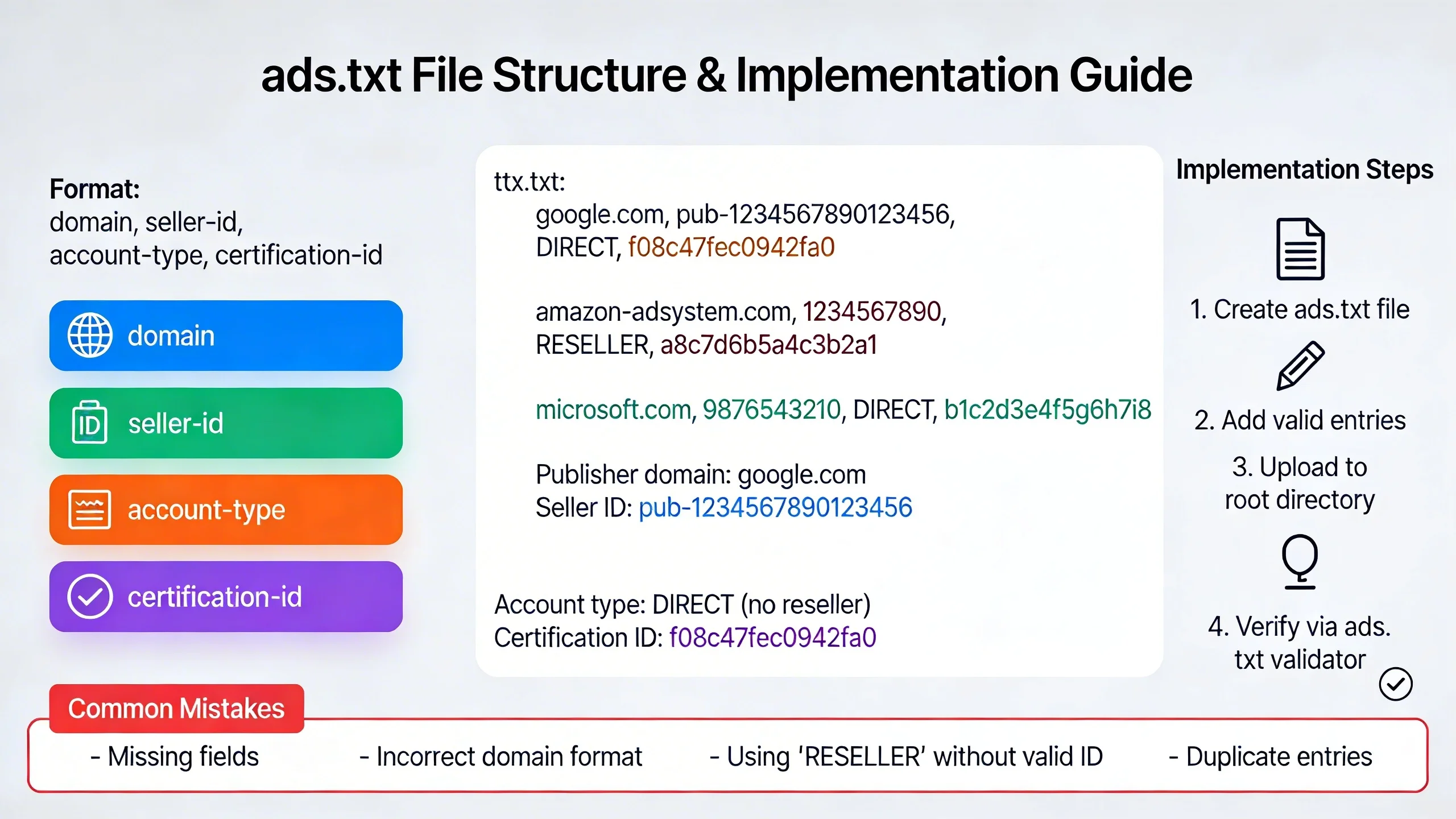
The file itself is remarkably simple, consisting of lines with up to four fields, separated by commas. Each line represents one authorized seller.
Here is a clear example using a <code> block:
# Example ads.txt file for myawesomesite.com

google.com, pub-0000000000000000, DIRECT, f08c47fec0942fa0

adnetworkx.com, 12345, RESELLER

adnetworky.com, 98765, DIRECT
Let's break down each field:
- Domain of the Advertising System: This is the operational domain of the SSP, ad exchange, or network you partner with (e.g.,
google.com). - Publisher’s Account ID: This is your unique identifier within that advertising system. Your partner will provide this to you. It's crucial this ID is 100% accurate.
- Type of Relationship: This field is critical.
* DIRECT: This means you have a direct contract and payment relationship with the company in field #1. You are paid directly by them.
* RESELLER: This means you have authorized another company to resell your inventory. For example, if you work with an ad network that uses Google Ad Exchange to fill impressions, their relationship with Google for your inventory would be RESELLER.
- (Optional) TAG ID: This is a unique identifier for the advertising system within a certification authority (like the Trustworthy Accountability Group, or TAG). While optional, it adds another layer of trust.
What is sellers.json? Shining a Light on the Seller
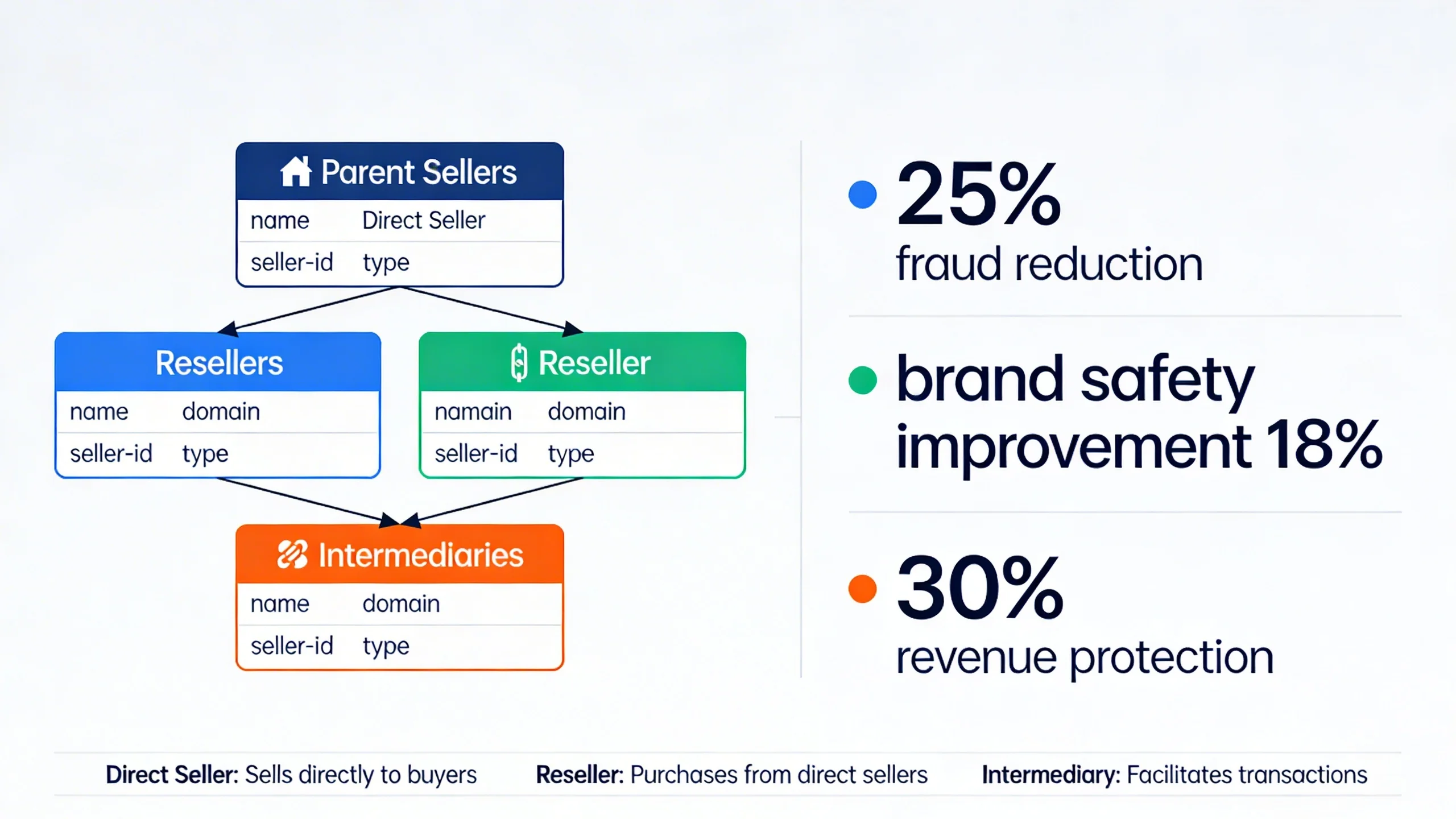
If ads.txt is your guest list, then sellers.json is your ad partner's public employee directory. It's a file hosted by your SSPs and exchanges that provides transparency about the identity of the end publishers they represent. It allows buyers to see exactly who is getting paid for the ad impression.
The Core Purpose: While ads.txt verifies that a seller is authorized to sell a publisher's inventory, sellers.json verifies the identity of that seller. It completes the chain of trust by allowing buyers to discover who the publisher is behind a specific Seller ID. This helps combat bad actors who hide behind opaque intermediary accounts.
How it Works (From a Publisher's Perspective):
You do not create or host this file. Your advertising partners (SSPs, exchanges) do. Your responsibility is to ensure your information within their file is accurate and transparent.
- Your Partner Hosts the File: An ad exchange like "AdNetworkX" hosts a file at
adnetworkx.com/sellers.json. - The File Lists Sellers: This file contains a list of all the sellers they work with, including you.
- Your Information is Disclosed: For each seller, the file discloses key information like their name, business domain, and unique seller ID.
- Buyers Cross-Reference: A DSP can now look at the
sellers.jsonfile and see thatseller_id: 12345corresponds to "My Awesome Site, Inc." with the domainmyawesomesite.com.
Breaking Down Key sellers.json Fields:
Here is a simplified snippet of what the entry for a publisher might look like inside a sellers.json file:
{

  "seller_id": "12345",

  "name": "My Awesome Site, Inc.",

  "domain": "myawesomesite.com",

  "seller_type": "PUBLISHER"

}
seller_id: This is your unique account ID, the same one you list in yourads.txtfile. This is the critical link between the two files.name: The legal name of your business.domain: Your business domain.seller_type: This is very important. It can bePUBLISHER(you own the site),INTERMEDIARY(you don't own the site but are authorized to sell its inventory), orBOTH. It is crucial for publishers to be correctly identified asPUBLISHERto build buyer trust.
The Symbiotic Relationship: How ads.txt and sellers.json Work Together
Neither file is a complete solution on its own. Their true power is unlocked when they are used together, creating a fully verifiable path from the buyer to the publisher. This end-to-end transparency is what the modern programmatic supply chain demands.
[Visual Aid Idea: A simple flowchart graphic showing the verification process would be highly effective here.]
The Buyer's Journey of Verification:
Imagine a DSP wants to buy an ad on your site, myawesomesite.com, and the bid request comes from a seller with the ID 12345 via adnetworkx.com. Here’s how the DSP uses both files to verify the transaction in milliseconds:
- A Bid Request Arrives: The DSP sees an ad opportunity from Seller ID
12345atadnetworkx.comfor an impression onmyawesomesite.com. - Step 1 (ads.txt check): The DSP's crawler immediately goes to
myawesomesite.com/ads.txt. It scans the file and finds the line:adnetworkx.com, 12345, RESELLER. Verification #1 is complete: AdNetworkX is an authorized seller. - Step 2 (sellers.json check): The DSP then fetches the file at
adnetworkx.com/sellers.json. - Step 3 (Verification): The DSP searches that file for
seller_id: "12345". It finds the entry and confirms the listed domain ismyawesomesite.comand the seller type isPUBLISHER. Verification #2 is complete: The identity of the seller is confirmed.
Because both checks passed, the DSP can bid with full confidence, knowing its ad will appear on the correct site and the payment will go to the legitimate publisher.
To make this process even more efficient, the IAB also introduced the SupplyChain Object (Schain). Think of Schain as a real-time "receipt" that is passed along with the bid request itself. It contains the same information found in ads.txt and sellers.json, effectively connecting the two and providing a full, transparent log of every entity that touched the ad impression.
Your Step-by-Step Guide to Implementing ads.txt
This part is entirely in your control. Follow these steps carefully to ensure your file is set up for success.
- Gather Your Information
Contact every single ad network, SSP, and ad exchange you work with. Ask them for their official ads.txt line for your account. They will provide you with a pre-formatted string containing their domain, your publisher ID, and the correct relationship type (DIRECT or RESELLER). Do not guess this information.
- Create the File
Open a simple text editor like Notepad (on Windows) or TextEdit (on Mac). Do not use a word processor like Microsoft Word, which can add hidden formatting that will break the file. Save the empty file with the exact name ads.txt.
- Format Correctly
Copy and paste each line provided by your partners into the text file. Each partner should be on a new line. Double-check for typos, extra spaces, or any formatting errors. A single misplaced character can invalidate a line.
- Upload to Your Root Domain
This is the most common point of failure. You must upload the ads.txt file to the root directory of your domain. It cannot be in a subdirectory. You should be able to access it in a browser by typing https://yourdomain.com/ads.txt. Use an FTP client or your hosting provider's file manager to place the file in the correct location (e.g., the public_html or www folder).
- Verify Your Implementation
Don't just upload and forget.
* Browser Check: First, try to access the file yourself at yourdomain.com/ads.txt. Make sure it loads correctly.
* Validator Tool: Use a free online ads.txt validator tool. These tools will crawl your file and flag any formatting errors or potential issues.
* Dashboard Check: Log into your Google Ad Manager or AdSense dashboard. Google actively crawls for this file and will display a warning if it can't find it or if there are errors.
The Publisher's Role in sellers.json: Ensuring Your Information is Correct
While you don't host the sellers.json file, you play a critical role in its accuracy. Your inaction here can be just as damaging as a missing ads.txt file.
Your Action Items:
- Log into Your Partner Dashboards: Go to the account settings section for each of your SSPs and exchanges.
- Find the Transparency Settings: Look for a section related to "Account Information," "Seller Information," or "sellers.json Transparency."
- Ensure Accuracy: Verify that your legal business name and primary domain are spelled correctly. This must match the information buyers expect to see.
- Opt-in to Transparency: Most platforms will give you a choice between being "Transparent" or "Confidential" (sometimes called "Anonymous"). It is highly recommended to always choose "Transparent." Choosing "Confidential" hides your name and domain in their
sellers.jsonfile. To a buyer, this looks suspicious and untrustworthy, and it will drastically reduce the number of bids you receive and lower your overall CPMs.
The Critical Consequences: The High Cost of Ignoring These Files
In today's programmatic landscape, proper implementation of ads.txt and sellers.json is not a suggestion—it's a requirement for survival. Ignoring them comes with a steep price.
Risks of an Incorrect or Missing ads.txt file:
- Drastic Revenue Loss: This is the biggest consequence. Most major DSPs, including Google's DV360, will not bid on inventory that cannot be verified via
ads.txt. Your fill rates and revenue will plummet overnight. - Blacklisting: Your domain could be algorithmically flagged by ad platforms as unsafe or potentially fraudulent, making it difficult to attract demand.
- Vulnerability to Fraud: Without
ads.txt, you are giving domain spoofers a green light to impersonate your site, stealing your brand's hard-earned reputation and siphoning away advertising dollars that should have been yours.
Risks of Being "Confidential" or Incorrect in sellers.json:
- Lower CPMs: Buyers are willing to pay a premium for transparent, verified inventory. If your identity is hidden, you will be relegated to lower-priority, lower-paying ad campaigns.
- Blocked Demand: A growing number of advertisers and agencies have a strict policy of only buying from sellers listed as "Transparent." By being confidential, you are cutting yourself off from this premium demand.
- Eroded Partner Trust: In an industry built on partnerships, appearing to hide your identity can damage your relationships with both buyers and your supply-side platforms.
***
[Optional Mid-Article CTA]
Feeling overwhelmed? The technical side of ad monetization can be complex. Our platform automates
ads.txtmanagement and ensures all your partnerships are set up for maximum transparency and revenue. [Learn More about Our Platform]
***
Common Mistakes and Best Practices
Avoid these common pitfalls to keep your ad revenue flowing smoothly.
Common ads.txt Errors:
- Typos: A single incorrect digit in a publisher ID or a misspelling in a domain name will invalidate that entry.
- Wrong Location: Uploading the file to a subdirectory (e.g.,
yourdomain.com/blog/ads.txt) instead of the root. - Incorrect Formatting: Using
DIRECTwhen the relationship isRESELLER, or vice versa. - Outdated Information: Forgetting to add new ad partners to the file or, just as importantly, failing to remove partners you no longer work with.
Best Practices:
- Audit Quarterly: Set a calendar reminder to review your
ads.txtfile every three months. Remove old partners and ensure all current partners are listed correctly. - Prioritize
DIRECT: Always useDIRECTfor your primary relationships where you are paid directly, such as your main Google AdSense or Ad Exchange account. - Keep a Master List: Maintain a separate document with the correct
ads.txtlines for all your partners so it's easy to update your file. - A Note on app-ads.txt: If you have a mobile app, be aware that a nearly identical standard called
app-ads.txtexists to bring the same transparency to the in-app advertising ecosystem.
Conclusion: Transparency Isn't Optional, It's Profitable
ads.txt and sellers.json are far more than just technical files; they are the foundational pillars of trust, safety, and profitability in the modern programmatic ecosystem. They are the simple, standardized language that allows publishers, advertisers, and platforms to work together in a clean, well-lit marketplace.
By implementing them correctly, you are sending a clear signal to the entire industry: you are a legitimate, high-quality publisher committed to transparency. In return, you protect your brand from fraud, maximize your revenue potential by unlocking access to premium advertisers, and solidify your position as a trusted partner in the digital advertising supply chain.
Managing these relationships and technical files can be a full-time job. If you want to ensure your setup is perfectly optimized for revenue without the headache, Schedule a Free Consultation with Our Experts to review your ad monetization strategy.